Anchor: A Playful Dingbat Typeface for Nautical Design
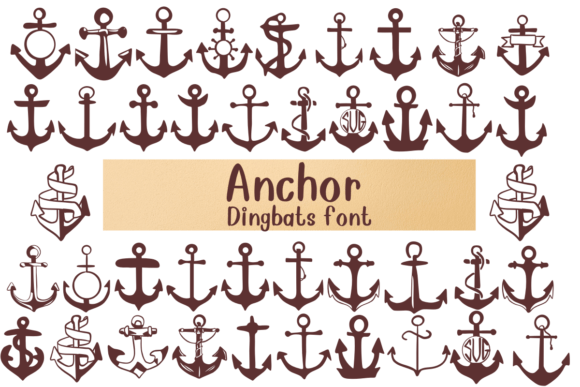
Sometimes, a project doesn't need a full sentence to make a point; it just needs a strong symbol. If you have ever found yourself scrolling through a library of sans serif font options or serif font families looking for that one perfect icon, you know the struggle. You need a visual shorthand for stability, adventure, or the sea. This is exactly where the Anchor typeface comes into play. It is a specialized dingbat font, meaning it doesn't contain letters in the traditional sense. Instead, each key you press on your keyboard generates a unique illustration of an anchor.
As a creative font, Anchor is less about legibility and more about personality. It bridges the gap between typography and illustration, acting as a design asset that can transform a flat layout into a themed experience. Whether you are a designer working on a coastal tourism brochure or a small business owner creating merchandise for a surf shop, having a dedicated set of nautical glyphs at your fingertips is incredibly useful. It takes the guesswork out of finding vector art and ensures that the stylistic weight of your icons matches your overall typography strategy.
The Visual Personality of the Anchor Font
What makes this typeface stand out in a crowded market of design assets is its refusal to be boring. Many nautical themes rely on the same standard clipart anchor we have seen a thousand times. The Anchor font, however, offers a variety of interpretations. You might find a classic, heavy-duty ship’s anchor on one key, and a whimsical, thin-line illustration suitable for a wedding invitation on another. This versatility is the font's strongest trait. It acknowledges that "nautical" can mean many things: it can be the rugged industrial feel of a shipping port, the vintage charm of a sailor’s tattoo, or the clean, geometric lines of modern coastal brand identity.
Because it functions as a display font (specifically a pictorial one), the visual weight of the characters is designed to command attention. These aren't subtle background elements; they are meant to be used as hero graphics. When evaluating the style, you’ll notice the attention to detail in the linework. Whether the style is distressed and textured or smooth and vector-perfect, the file quality is typically high enough to support large-format printing. This makes it a viable alternative to searching through stock photo sites for a single icon. Instead of treating the anchor as a generic image, you treat it as a character in your typographic system, ensuring that the visual style remains consistent from the headline down to the decorative flourishes.
Strategic Applications: Where Anchor Works Best
Understanding where to deploy a dingbat font is key to professional editorial design and branding. The Anchor typeface isn't suitable for body copy, obviously, but it shines in specific areas where visual hierarchy and thematic reinforcement are needed. Here is how different creative professionals can leverage this font:
- Logo Design and Brand Identity: For businesses in the seafood, sailing, or travel industries, an anchor is a foundational symbol. Using the Anchor font allows you to quickly iterate on different styles of the symbol during the concept phase. You can pair a bold, heavy anchor glyph with a sturdy slab serif font for a rugged look, or match a delicate anchor with a flowing script font for a high-end resort vibe.
- Packaging Design: Imagine a craft beer label or a bottle of hot sauce with a coastal theme. You need an icon that fits the dimensions of the label without looking like pasted-on clipart. Because the characters in this font are designed as a cohesive set, you can ensure the "weight" of the icon matches the typography used for the product name.
- Social Media Graphics: Content creators often struggle to maintain a consistent aesthetic. Using the Anchor font as a watermark, a bullet point, or a background texture can instantly establish a "coastal" mood for an Instagram grid or Pinterest board. It works particularly well when overlaid on photography to create a layered, professional effect.
- Web Design: In web design, iconography is vital for user experience. While you wouldn't use this for standard UI icons, it is perfect for landing pages dedicated to summer sales, beach weddings, or maritime history. Using the font ensures the anchor renders crisply at any screen resolution compared to some rasterized images.
- Apparel and Merchandise: For hobbyists and entrepreneurs creating t-shirts or tote bags, this font is a goldmine. It provides instant "artwork" that can be scaled to fit the chest of a t-shirt or the corner of a bag. The variety of styles means you aren't selling the same design everyone else is; you can mix and match glyphs to create a unique composition.
Practical Guidance for Implementation
While Anchor is a premium font asset that simplifies the creative process, using a dingbat typeface effectively requires a bit of technical know-how. It is not as simple as typing a sentence. You are essentially managing a library of vector illustrations mapped to keyboard keys.
Mastering Font Pairings
The most common mistake with themed pictorial fonts is pairing them with typefaces that fight for attention. Since Anchor is highly illustrative, it needs a strong typographic partner. Generally, you want to pair it with a sans serif font or a serif font that has a neutral or complementary personality.
If your anchor glyph is thick and bold (chunky style), look for a "grotesque" or "geometric" sans serif that has similar stroke weights. If your chosen anchor is fine and delicate (line art style), a light-weight serif or a modern handwritten font would create a beautiful contrast. Avoid pairing it with other highly decorative fonts, such as complex script fonts, as this will create visual clutter. The anchor should be the star; the text should be the supporting cast.
Technical Tips for Designers
Because you cannot "read" the font in the traditional sense, you will need to use the Glyphs panel in your design software (like Adobe Illustrator, Photoshop, or Affinity Designer) to access all the variations. Do not rely on just typing the letter "A" or "B" and hoping for the best. Open the character map to see the full range of anchors available. You might find that the letter "G" contains a vintage rope-style anchor that is perfect for your project, while "H" contains a modern, geometric one.
Furthermore, consider the commercial font licensing. If you are a small business owner using this for your logo, ensure your license covers commercial use. Most standard licenses cover this, but if you are a large agency or a publisher creating templates for resale, you may need an extended license. Always read the EULA (End User License Agreement) to avoid copyright issues down the road.
Readability and Hierarchy
Since Anchor is a dingbat font, traditional readability metrics don't apply in the same way they do for a modern typography text face. However, "readability" in this context refers to the clarity of the icon. If you use an anchor glyph at a very small size, intricate details (like rope textures or small flukes) might get lost or look like a smudge. Always test your design at the intended output size. If you are designing for a business card, use a simpler style. If you are designing for a billboard or a t-shirt, you can use the most detailed styles available.
Ultimately, the Anchor typeface is a specialized tool for a specific job. It solves the problem of finding cohesive, high-quality nautical imagery. By integrating it into your workflow as a design asset rather than just a font, you can elevate your packaging design, editorial design